FFmpeg Halation: How to Add Film Glow from the Command Line

Search “halation” and you get GUI tutorials. Dehancer, DaVinci, Premiere - all want you in an app, clicking sliders. Nobody shows you how to do it from the terminal. So here it is, the actual filter graph, plus a one-flag version if you’d rather not hand-tune blend modes at midnight.
What is halation?
Halation is the soft red-orange glow that bleeds around bright highlights in film. It happens when strong light passes through the emulsion, hits the film base behind it, and reflects back into the surrounding grains. Digital sensors don’t do this, which is part of why digital can look “too clean.” Faking it well is mostly about isolating the highlights, blurring them, tinting them warm, and adding them back.
That’s the whole trick. Three steps. Let’s build it in FFmpeg.
The FFmpeg way (the honest, fiddly version)
There’s no --halation in FFmpeg, so you compose it from filter_complex: threshold the luma to grab only the highlights, blur that, tint it red, then screen-blend it back over the original.
ffmpeg -i input.mp4 -filter_complex "\[0:v]split=2[base][bright];\[bright]lutyuv='y=if(gt(val,180),val,0)',\gblur=sigma=12,\colorchannelmixer=rr=1:gg=0.35:bb=0.2[glow];\[base][glow]blend=all_mode=screen:all_opacity=0.6[out]" \-map "[out]" output.mp4Reading that part by part:
lutyuv='y=if(gt(val,180),val,0)'- keep luma above 180, zero everything else. This is the highlight mask.gblur=sigma=12- blur the mask so the glow spreads.colorchannelmixer=rr=1:gg=0.35:bb=0.2- push the blurred highlights red-orange. This is what reads as film bloom rather than a generic blur.blend=all_mode=screen:all_opacity=0.6- screen mode adds light without crushing the base; opacity dials the intensity.
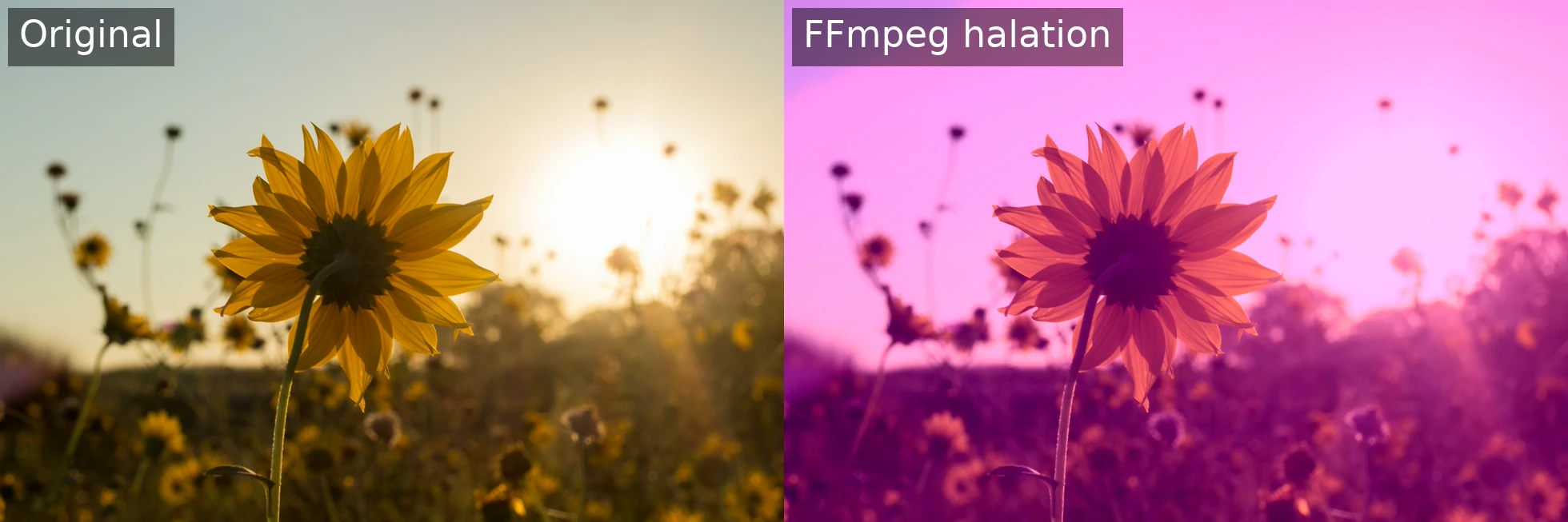
It works, but it is blunt. Look at the comparison below. The glow does not sit on the sun; it floods the whole sky. That is the highlight mask: a hard cutoff that grabs every bright pixel, so the entire high-key background lights up instead of just the sun.
The colour is off too. The glow is red-orange, but screen it over a blue sky and the result reads pink. The same warm glow looks right on the sunflower and wrong everywhere else. To control any of this you have four settings pulling against each other, tuned by hand for every shot. Fine for learning how halation works, painful across a whole edit.
…or one flag with Hance
Once you’ve done it the hard way, here’s the short way. Hance is a single binary that does film looks from the command line, with halation included as a first-class effect:
hance input.mp4 --halation-amount 0.4 --halation-radius 45--halation-amount(0-1, default 0.25) - intensity.--halation-radius(1-100, default 4) - spread.--halation-highlights-only(default true) - restrict the glow to highlights, the same idea as the luma threshold above, done properly.
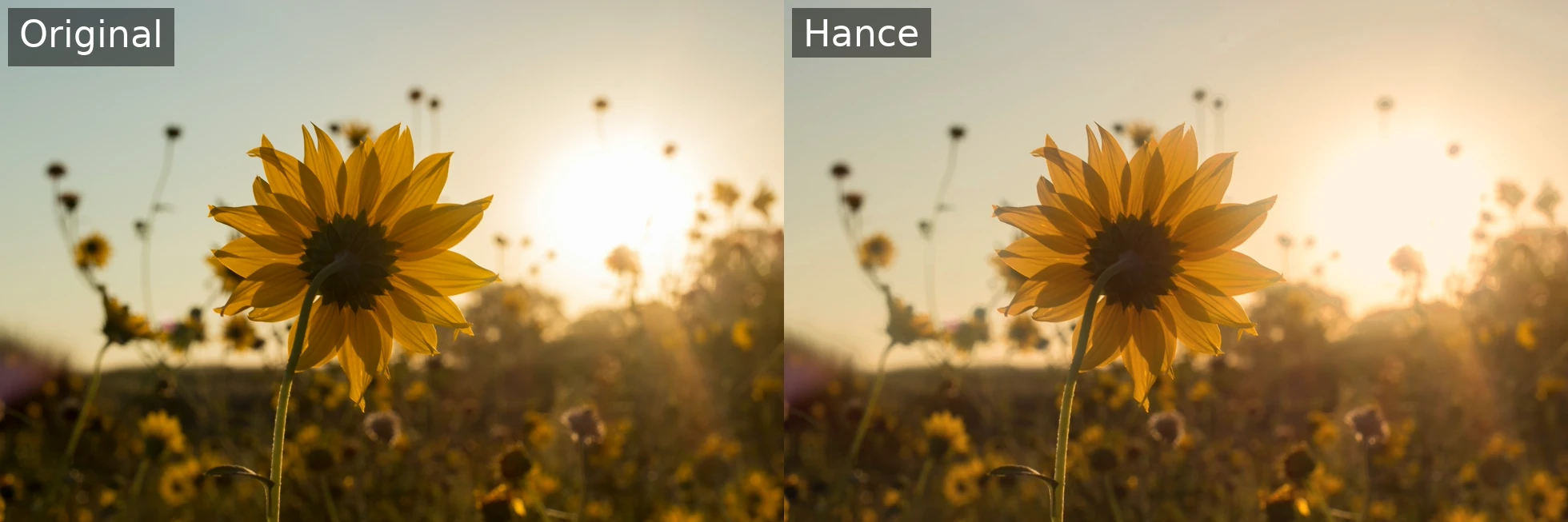
NOTE: Exposure is bumped slightly on purpose. The glow sits on top of the highlights and makes them read denser, so a small lift brings them back rather than letting the look go muddy.
The glow rolls off more smoothly because the highlight mask is a proper luminance curve rather than a hard luma threshold, so it stays on the highlights instead of tinting the whole high-key sky.
See the effects reference for the full list of flags. Same input plus same flags always produces the same frame, so it drops straight into a batch script or CI. No app, no plugin, no subscription. It’s beta and mac-first today (worth knowing), but if your goal is “I want film halation in a pipeline,” it beats hand-authoring filter_complex per clip.
# try with no install (needs ffmpeg on PATH)npx @orva-studio/hance input.mp4 --halation-amount 0.4 --halation-radius 45FAQ
Is halation the same as bloom or glow? Related but not identical. Bloom glows around any bright area in roughly neutral colour; halation is specifically the warm, red-leaning reflection from film base, and it favours highlights against darker surroundings.
Why does my FFmpeg halation look fake?
Usually the tint is missing or too neutral. The red-orange cast from colorchannelmixer is what sells it. Also check your threshold isn’t so low that midtones glow.
Can I apply this to a whole folder? With raw FFmpeg you’d script a loop. With Hance the same flags run across a batch and stay reproducible frame-for-frame.
Halation is one of those effects that’s simple in principle and finicky in practice. Although I’m biased towards Hance, I think you should use whichever tool fits the job.
Happy grading 👋